


Alex
-
Posts
262 -
Joined
1 Follower

Recent Profile Visitors
35551 profile views




Alex's Achievements

Newbie (1/14)
-

-
 Rare
Rare
-

-
 Rare
Rare
-
 Rare
Rare
Recent Badges
-
Hi cestarik, If you've added four Office 2024 LTSC license keys to the license, you can manually assign the appropriate key to each installation. To do this, click the drop-down arrow in the License key column and select one of the four keys you've added. As soon as the correct key is assigned, the status should change from Wrong key: not specified to Compliant. Manual key assignment works both when TNI has automatically detected and collected the installed license key and when no license key was detected during the scan. In either case, you can manually associate the installation with the correct license key, allowing TNI to verify the installation and mark it as Compliant. I also discussed this with my colleagues, and we found that TNI does not currently collect Office LTSC 2024 license keys in all cases. We've therefore added a task to improve this behavior in one of the future updates.

-

LDAP(S) sync after Update 6.7 not possible (anymore)
Alex replied to Claudio's topic in Total Network Inventory
Hello Claudio, Thank you for reporting this issue, and we apologize for the inconvenience caused. We have already identified the problem on our side. We’ve sent you an email with an updated installer containing a quick fix that you can use in the meantime. The official fix will be released early next week as part of a regular patch. Thank you for your patience and for bringing this to our attention. -
Hi cestarik, Based on the description, this looks like a firewall signature log, not a TNI error. During SNMP discovery, TNI sends SNMP v1/v2c and/or SNMPv3 requests to devices. Firewalls may interpret these queries as unauthorized SNMP access and trigger signatures like HP.OpenView.Hidden.SNMP.Community.Unauthorized.Access. Check the event details on the FortiGate. If the source IP matches the server where TNI is installed, this behavior is expected during scanning. If the firewall is blocking the traffic, SNMP discovery may be affected. In that case, add an exception or whitelist rule for the TNI server, or adjust the policy for internal SNMP scanning so these queries are allowed.
-
Hi Lukas, Thank you for your feedback. You are correct: Total Software Deployment currently supports only local file-based storage and does not work with external SQL databases such as PostgreSQL. At this time, centralized database support is not planned for the near future. We have noted your request and will take it into account when considering future development. We appreciate you taking the time to share your use case.
-
I don't understand the sysshot method
Alex replied to help22970's topic in Total Software Deployment
We don't really recommend using the Sysshot method for drivers. In rare cases, deploying drivers using this method can damage the remote system. Some drivers may not apply to different systems in the same way, so deploying such changes can lead to unforeseen consequences. -
I don't understand the sysshot method
Alex replied to help22970's topic in Total Software Deployment
Hello, Thanks for your message. It is recommended to use the Sysshot method only when it is not possible to create a deployment package using the Silent or Marco methods. It is suitable for small programs that don't make many changes in the system where you install them. To create a deployment package, TSD makes 2 snapshots of your system (before and after the installation). Then TSD allows you to create a deployment package based on the difference between the states of the system. You can manually select which changes in the regstry and file system should be considered as part of the installation process. Please let us know if you have any questions. -
Dear Kevin, Sorry for bringning the bad news, but it turns out that solving this problem requires a major rebuild of the existing Linux agent. This task is currently postponed as it will take a significant amount of time to rebuild the agent from scratch. We need more feedback to prioritize this task.
-
Hello Darren, It is not possible to check the age of a computer directly, but you can check the dates in: BIOS information: Release date Memory module: Manufacture date You can build a table report and roughly determine the age of a computer based on this information.
-
Caducidad de garantia en scaneo TNI
Alex replied to Victor Hernandez's topic in Total Network Inventory
Gracias por su mensaje. Desafortunadamente, la versión actual del programa no puede recopilar dicha información. Puede agregar manualmente la fecha de vencimiento de la garantía para cada computadora usando los campos personalizados. -
Dear Kevin, Most likely, the next update will be released in April. But I'm not sure if the agent will be fixed by then.
-
Dear Kevin, Unfortunately we were unable to reproduce the problem. But the TNI team has found an issue in the scanning agent that could be causing it. This issue will be fixed in the future updates.
-
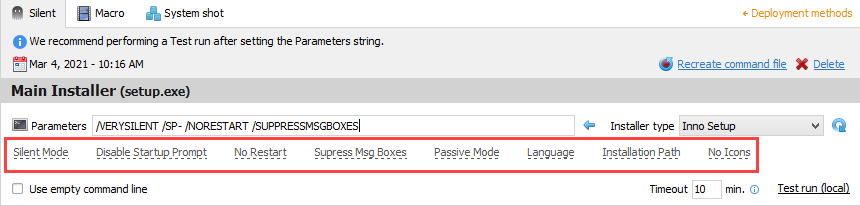
Sorry for the delay. If the activation is not part of the installation process, it cannot be performed with the marco method. Unfortunately there is nothing we can do here. In this case, we recommend that you contact the developers of the software you are trying to deploy. Usually they can share specific parameters that can be used for silent installation and activation. The default parameters for each type of installer can be found in Software editor: Additional parameters can only be requested from the developers of the software you would like deploy.
-
Hello, Thanks for your message. If the activation of the program is part of the installation process and TSD can record (capture) the activation window, there should be no problem with the creation of the deployment package. Otherwise, the Macro method cannot be used for activation. In this case, you can ask the developer of the software that you are trying to install whether there is an activation parameter that can be used for silent installation.
-
Dear Kevin, Thanks for the detailed description. I have sent this information to our QA team. We will try to reproduce this problem.
-
Dear Kevin, There may be a problem with the scanning agent. Please let us know how the VMs are configured so that we can reproduce the problem in our environment. We need the following information: 1. Virtualization platform. 2. What do you use as a domain controller for the Linux VMs. How the connection to the DC is configured. 3. Additional packages installed on the VM and their configuration (related to authorization and domain).
